はじめに
本記事は、「いつでもどこでも、ポケットから取り出して即座にコーディングできるVim環境」を構築するまでの備忘録を記したものです。
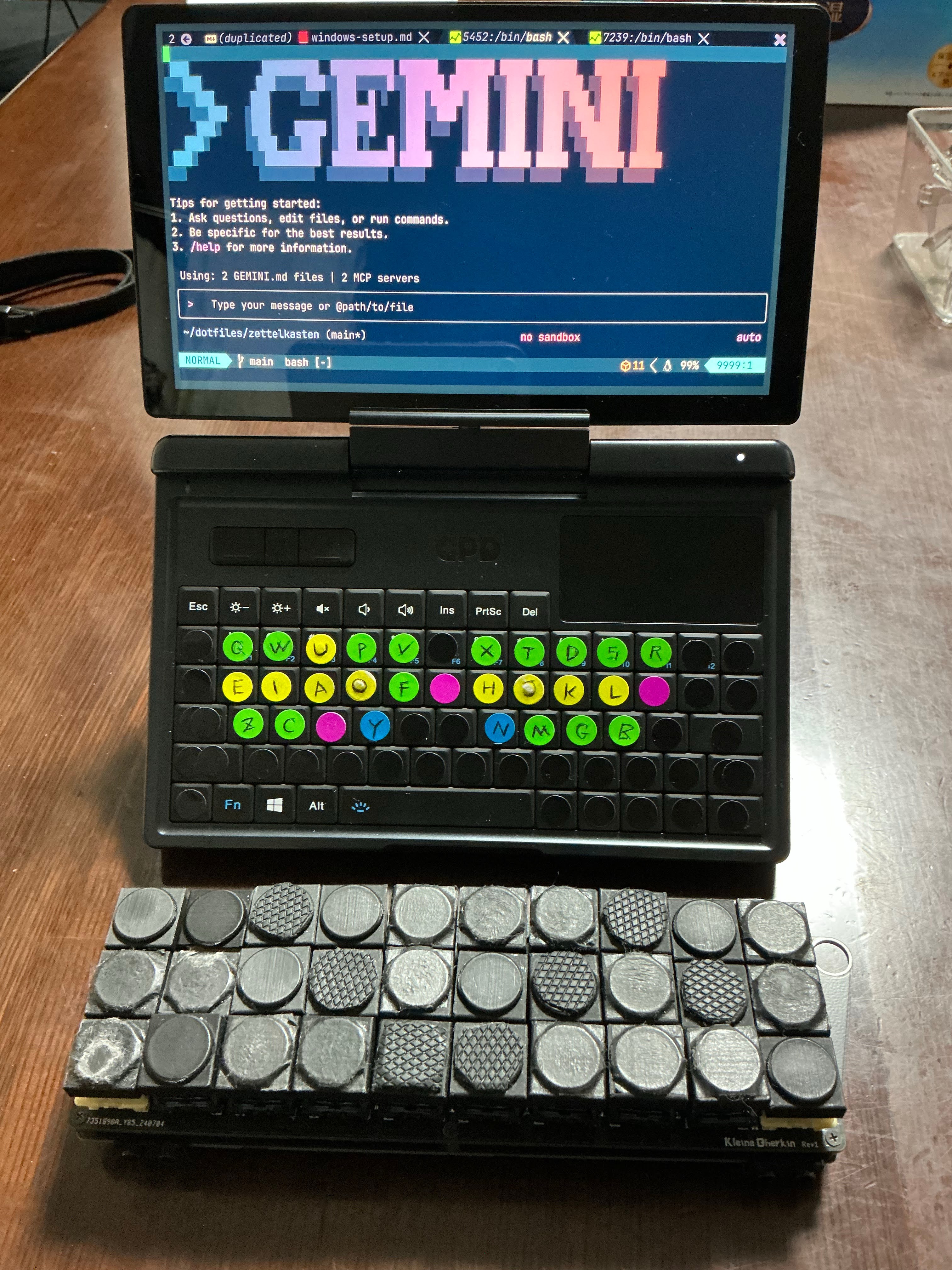
使用するハードウェアは、超小型UMPCである GPD Micro PC 2。当初はLinuxをネイティブインストールしようとしましたが、起動に30秒以上かかる現実に直面しました。「書きたい瞬間に書けない」環境は、モバイル端末として致命的です。
そこで辿り着いたのが、Windows 11 + WSL2 という選択肢です。WezTermと組み合わせることで瞬時の起動を実現しました。AutoHotkeyで大西配列を導入し、どこでもvimを操作して開発ができるようになりました!
Step 1: 基盤構築 (WSL2 & WezTerm)
WSL2 (Windows Subsystem for Linux 2) は、Windows上でLinuxカーネルをネイティブに近いパフォーマンスで動作させる技術です。wsl --install コマンド一つで導入でき、Windowsファイルシステムともシームレスに統合されています。
初心者向けのWSL2導入ガイドとして、Windows 11 に WSL2 Ubuntu をインストールして使ってみる【誰でもできるよ】 が非常に参考になります。ターミナル操作に不慣れな方でも、画像付きの丁寧な手順に従うだけでUbuntu環境を構築できます。本ガイドの前提となるWSL環境の準備に不安がある場合は、まずこちらの記事を一読することをお勧めします。
WezTermの導入
起動速度と設定の柔軟性から、ターミナルにはWezTermを採用します。以下の構成により、Windows側からWSL内の設定ファイルを直接読み込ませる「ブリッジ構成」を実現します。
- Windows側:
C:\Users\{{ユーザ名}}\ .wezterm.luaを作成し、以下のコードを記述。 - WSL側:
~/dotfiles/windows/.wezterm_windows.luaに実体設定を配置。
📂 Windows側 .wezterm.lua (ブリッジ設定)
-- ディストリビューション名(Ubuntu)は環境に合わせて書き換えてください
-- 注意: Windowsのパス区切り(\ではなくスラッシュ(/)を使うとトラブルが少ないです
return dofile("//wsl$/Ubuntu/home/{{ユーザ名}}/dotfiles/windows/.wezterm_windows.lua")
📂 WSL側 .wezterm_windows.lua (実体設定)
local wezterm = require("wezterm")
local config = wezterm.config_builder()

-- 1. フォント設定 (Windows向けに変更)
config.font = wezterm.font_with_fallback({
        "JetBrains Mono", -- WezTerm標準搭載フォント(インストール不要)
        "Meiryo", -- Windows標準のメイリオ、または "Yu Gothic" など
        "Segoe UI Emoji", -- Windows標準の絵文字フォント
})
config.font_size = 16 -- 画面のDPIによっては大きく見える場合があるため、適宜調整してくだ
さい
config.enable_tab_bar = false

-- 2. ウィンドウ装飾
-- "RESIZE" はタイトルバーを消し、リサイズ可能な枠のみを残します
config.window_decorations = "RESIZE"
config.window_background_opacity = 0.8

-- 3. 背景のブラー効果 (Windows 10/11用)
-- "Acrylic" (すりガラス) または "Mica" が指定可能です
config.win32_system_backdrop = "Acrylic"

-- 4. カラー設定 (変更なし)
config.colors = {
        foreground = "#CBE0F0",
        background = "#011423",
        cursor_bg = "#47FF9C",
        cursor_border = "#47FF9C",
        cursor_fg = "#011423",
        selection_bg = "#033259",
        selection_fg = "#CBE0F0",
        ansi = { "#214969", "#E52E2E", "#44FFB1", "#FFE073", "#0FC5ED", "#a277ff", "#24E
AF7", "#24EAF7" },
        brights = { "#214969", "#E52E2E", "#44FFB1", "#FFE073", "#A277FF", "#a277ff", "#
24EAF7", "#24EAF7" },
}

-- 5. シェル設定 (オプション)
-- 起動時に WSL (Ubuntu等) を自動で開きたい場合は以下を有効にしてください
config.default_prog = { "wsl.exe", "--cd", "~" }
-- PowerShell 7 を使いたい場合
-- config.default_prog = { "pwsh.exe" }

return config
Step 2: Linux環境の初期化 (init_linux.sh)
WSL環境の構築を自動化するため、init_linux.sh を作成しました。このスクリプトは以下の重要コンポーネントを導入します。
インストールされる主要コンポーネント一覧
- 開発ツール: build-essential, git, curl, unzip
- シェル: zsh
- パッケージ管理: Homebrew (Linuxbrew)
- WSL連携: wslu (wslview)
- アプリ: Obsidian (日本語環境含む)
- ロケール設定: en_US.UTF-8 (PostgreSQL対策)
📂 init_linux.sh (全文掲載)
#!/bin/bash

# WSL/Linux 環境セットアップスクリプト
# コマンドの返り値が非ゼロのとき停止する
set -e

echo "======================================="
echo "|---- Locale Generation (Fix for Postgres) ----|"
echo "======================================="
# PostgreSQLなどのために en_US.UTF-8 ロケールを生成・設定
if [ -f /etc/debian_version ]; then
    sudo apt-get update
    sudo apt-get install -y locales
    if ! grep -q "^en_US.UTF-8 UTF-8" /etc/locale.gen; then
        echo "Generating en_US.UTF-8 locale..."
        sudo locale-gen en_US.UTF-8
        sudo update-locale LANG=en_US.UTF-8
        export LANG=en_US.UTF-8
    else
        echo "en_US.UTF-8 locale already exists."
    fi
fi
echo -e "\n --------------- END ----------------"


echo "======================================="
echo "|---- Base Dependencies (apt) ----|"
echo "======================================="
# Debian/Ubuntu 系を想定
if [ -f /etc/debian_version ]; then
    # zsh もここでインストールしておく
    if ! dpkg -s build-essential zsh >/dev/null 2>&1; then
        read -p "build-essential, zsh などをインストールしますか?(y/n) " Answer < /dev/t
ty
        case ${Answer} in
            y|Y)
                sudo apt-get update
                sudo apt-get install -y build-essential curl file git unzip zsh
                ;;;
            n|N)
                echo "apt install をスキップしました" ;;
        esac
    else
        echo "build-essential, zsh はインストール済みです"
    fi
else
    echo "Debian/Ubuntu 系ではないため、apt コマンドをスキップします。"
fi
echo -e "\n --------------- END ----------------"

echo "======================================="
echo "|----------- wslu (WSL Utilities) -----------|"
echo "======================================="
if [ -f /etc/debian_version ]; then
    if ! command -v wslview >/dev/null 2>&1; then
        read -p "wslu (wslview) をインストールしますか?(y/n) " Answer < /dev/tty
        case ${Answer} in
            y|Y)
                # add-apt-repository がない場合に備えて
                if ! command -v add-apt-repository >/dev/null 2>&1; then
                     sudo apt-get install -y software-properties-common
                fi
                sudo add-apt-repository ppa:wslutilities/wslu -y
                sudo apt-get update
                sudo apt-get install -y wslu
                ;;;
            n|N)
                echo "wslu のインストールをスキップしました" ;;
        esac
    else
        echo "wslu は既にインストール済みです"
    fi
fi
echo -e "\n --------------- END ----------------"

echo "======================================="
echo "|----------- Obsidian (WSL) -----------|"
echo "======================================="
if [ -f /etc/debian_version ]; then
    read -p "Obsidian (および日本語化設定) をインストールしますか?(y/n) " Answer < /dev/
tty
    case ${Answer} in
        y|Y)
            echo "Installing Obsidian..."
            # GitHub APIから最新のdebパッケージのURLを取得
            deb_link=$(curl -s https://api.github.com/repos/obsidianmd/obsidian-releases
/releases/latest | grep "browser_download_url" | grep "amd64.deb" | cut -d '"' -f 4)
            if [ -z "$deb_link" ]; then
                echo "Obsidianのダウンロードリンクが取得できませんでした。"
            else
                wget "$deb_link" -O obsidian_latest.deb
                sudo dpkg -i ./obsidian_latest.deb || true
                sudo apt-get install -f -y
                rm ./obsidian_latest.deb
                echo "Obsidian installed."
            fi

            echo "Installing Japanese fonts, input support (IBus + Mozc), and dependenci
es..."
            sudo apt-get update
            sudo apt-get install -y libasound2t64 fonts-noto-cjk fonts-noto-color-emoji
fonts-ipafont-gothic fonts-ipafont-mincho ibus ibus-mozc

            # 環境変数の設定 (すでに設定されているか確認して追記)
            if ! grep -q "GTK_IM_MODULE=ibus" "$HOME/.bashrc"; then
                echo 'export GTK_IM_MODULE=ibus' >> "$HOME/.bashrc"
            fi
            if ! grep -q "QT_IM_MODULE=ibus" "$HOME/.bashrc"; then
                echo 'export QT_IM_MODULE=ibus' >> "$HOME/.bashrc"
            fi
            if ! grep -q "XMODIFIERS=@im=ibus" "$HOME/.bashrc"; then
                echo 'export XMODIFIERS=@im=ibus' >> "$HOME/.bashrc"
            fi
            # zshrc にも同様に設定 (zshを使っている場合)
            if [ -f "$HOME/.zshrc" ]; then
                if ! grep -q "GTK_IM_MODULE=ibus" "$HOME/.zshrc"; then
                    echo 'export GTK_IM_MODULE=ibus' >> "$HOME/.zshrc"
                fi
                if ! grep -q "QT_IM_MODULE=ibus" "$HOME/.zshrc"; then
                    echo 'export QT_IM_MODULE=ibus' >> "$HOME/.zshrc"
                fi
                if ! grep -q "XMODIFIERS=@im=ibus" "$HOME/.zshrc"; then
                    echo 'export XMODIFIERS=@im=ibus' >> "$HOME/.zshrc"
                fi
            fi
            echo "Japanese environment setup complete."
            ;;;
        n|N)
            echo "Obsidian のインストールをスキップしました" ;;
    esac
fi
echo -e "\n --------------- END ----------------"

echo "======================================="
echo "|----------- Homebrew -----------|"
echo "======================================="
# Linuxbrew の確認
if ! command -v brew >/dev/null 2>&1; then
  read -p "Homebrew (Linuxbrew) をインストールしますか?(y/n) " Answer < /dev/tty
  case ${Answer} in
    y|Y)
      /bin/bash -c "$(curl -fsSL https://raw.githubusercontent.com/Homebrew/install/HEAD
/install.sh)"

      # Linuxbrew のパス設定 (一般的なパス)
      test -d ~/.linuxbrew && eval "$(~/.linuxbrew/bin/brew shellenv)"
      test -d /home/linuxbrew/.linuxbrew && eval "$(/home/linuxbrew/.linuxbrew/bin/brew
shellenv)"

      # シェル設定ファイルへの追記 (zsh/bash)
      # .bashrc にも追記しないと bash から zsh に切り替えるまでの間パスが通らない
      if [ -f "$HOME/.bashrc" ]; then
        if ! grep -q "brew shellenv" "$HOME/.bashrc"; then
            echo "eval \"$(
brew --prefix)/bin/brew shellenv)\"" >> "$HOME/.bashrc"
        fi
      fi
      if [ -f "$HOME/.zprofile" ]; then
        if ! grep -q "brew shellenv" "$HOME/.zprofile"; then
            echo "eval \"$(
brew --prefix)/bin/brew shellenv)\"" >> "$HOME/.zprofile"
        fi
      elif [ -f "$HOME/.zshrc" ]; then
         if ! grep -q "brew shellenv" "$HOME/.zshrc"; then
            echo "eval \"$(
brew --prefix)/bin/brew shellenv)\"" >> "$HOME/.zshrc"
        fi
      fi
      ;;;
    n|N)
      echo "Homebrew のインストールをスキップしました" ;;
  esac
else
  echo "すでに Homebrew はインストール済みです"
  # 念のため現在のシェルでも使えるようにする
  test -d ~/.linuxbrew && eval "$(~/.linuxbrew/bin/brew shellenv)"
  test -d /home/linuxbrew/.linuxbrew && eval "$(/home/linuxbrew/.linuxbrew/bin/brew shel
lev)"
fi
echo -e "\n --------------- END ----------------"

echo -e "\n"
echo "======================================="
echo "|----------- symbolic link -----------|"
echo "======================================="
read -p "symbolic link を貼りますか(y/n) " Answer < /dev/tty
case ${Answer} in
  y|Y)
        # dotfilesにあるドットファイルをfor文で回し、ホームディレクトリにシンボリックリ
ンクを貼る
        # .git や .config (フォルダごとリンクする場合もあるが、ここでは個別に除外または
対応) は注意
        # init_mac.sh のロジックを踏襲
        for f in .??*; do
            [ "$f" = ".git" ] && continue
            [ "$f" = ".DS_Store" ] && continue

            # 既存のファイル/ディレクトリがあればバックアップまたは上書きの確認が必要だ
が、
            # ln -snfv は強制的にシンボリックリンクを張り替える
            ln -snfv ~/dotfiles/"$f" ~
        done
    ;;;
  n|N)
    echo "symbolic link をスキップしました" ;;
esac
echo -e "\n --------------- END ----------------"


echo "======================================="
echo "|--------- create my ci dev env------------|"
echo "======================================="
read -p "create my ci dev env しますか? (y/n) " Answer < /dev/tty
case ${Answer} in
    y|Y)
        # mac specific removed (yabai, skhd, karabiner, fonts, GUI apps)

        brew install neovim
        brew install ripgrep
        brew install jesseduffield/lazygit/lazygit

        brew install go
        brew install tree
        brew install gh

        brew install nodebrew
        brew install curl
        brew install deno
        brew install docker
        brew install docker-compose
        brew install zsh-completions
        brew install direnv
        brew install pyenv
        brew install nvm

        brew install lynx
        brew install luarocks
        brew install wget
        brew install rust
        brew install composer
        brew install php
        brew install openjdk
        brew install julia
        # goku is mac only (karabiner)
        brew install mysql@8.0
        brew install postgresql@16

        # Fix for Postgres Locale issue if it failed previously
        brew postinstall postgresql@16 || true

        brew install node
        # font-meslo-lg-nerd-font is GUI/System font

        # 追加: よく使われるツール・依存パッケージ
        brew install bash
        brew install fish
        brew install fd
        brew install jq
        brew install make
        brew install pkgconf
        brew install python@3.12
        brew install python@3.13
        brew install sqlite
        brew install xz
        brew install zlib
        brew install boost
        brew install protobuf@29
        brew install openssl@3
        brew install llvm
        brew install autoconf
        brew install automake
        brew install libtool
        brew install gettext
        brew install ca-certificates
        brew install unixodbc
        brew install webp
        brew install tree-sitter
        brew install pipx
        brew install pillow
        # brew install pngpaste # Mac only
        brew install stylua
        brew install uv
        brew install awscli

        # brew install mcp-proxy # Check if needed

        # GUI Apps Removed (wezterm, karabiner, postman, chatgpt, raycast, obsidian, cod
ex, aquaskk)

        mkdir -p ~/.nvm

        npm install -g prettier eslint_d
        ;;;
    n|N)
        echo "インストールをスキップしました" ;;
esac
echo -e "\n --------------- END ----------------"

echo "======================================="
echo "|----------- ZSH Setup -----------|"
echo "======================================="
# デフォルトシェルを zsh に変更するか確認
if [ "$SHELL" != "$(which zsh)" ]; then
    read -p "デフォルトシェルを zsh に変更しますか? (y/n) " Answer < /dev/tty
    case ${Answer} in
        y|Y)
            chsh -s "$(which zsh)"
            echo "デフォルトシェルを変更しました。ログアウト後に有効になります。"
            ;;;
        n|N)
            echo "シェルの変更をスキップしました。" ;;
    esac
fi
Step 3: Neovim & クリップボード連携
WSL上のNeovimからWindowsのクリップボードへテキストをコピーするために、win32yank.exe を使用します。
3.1 win32yankの導入
GitHubから win32yank.zip をダウンロード。
詳細な導入手順 (解凍・配置・パス設定)
- 上記リンクから最新の
win32yank-x64.zipをダウンロードします。 - エクスプローラーでzipファイルを右クリックし、「すべて展開」を選択して解凍します。
- WSLターミナルを開き、以下のコマンドを実行して配置と設定を行います。
# 1. binディレクトリ作成と移動
mkdir -p ~/bin
# (注意: ダウンロード先は各自の環境に合わせて変更してください)
mv /mnt/c/Users/{{ユーザ名}}/Downloads/win32yank-x64/win32yank.exe ~/bin/

# 2. 実行権限の付与
cd ~/bin
chmod +x win32yank.exe

# 3. パスの設定 (.bashrc または .zshrc)
echo 'export PATH=$HOME/bin:$PATH' >> ~/.bashrc
source ~/.bashrc

# 4. 確認
which win32yank.exe
3.2 Neovim設定 (Lua)
Neovimの設定ファイル (init.lua) に以下を記述することで、WSL内でのヤンク操作がWindowsのクリップボードに同期されます。
📂 wsl.lua (Neovim設定)
if vim.fn.has("wsl") == 1 then
    -- win32yank.exe を使用する設定
    vim.g.clipboard = {
        name = "win32yank",
        copy = {
            ["+"] = "win32yank.exe -i --crlf",
            ["*"] = "win32yank.exe -i --crlf",
        },
        paste = {
            ["+"] = "win32yank.exe -o --lf",
            ["*"] = "win32yank.exe -o --lf",
        },
        cache_enabled = 0,
    }

    -- クリップボード同期を有効化
    vim.opt.clipboard = "unnamedplus"
end
Step 4: Windows環境 & 入力デバイス設定
4.1 Windows Updateの悪夢と解決
この絶望的な状況を救ってくれたのは、以下の解説動画でした。インプレースインストールの手順が非常に分かりやすく解説されており、これのおかげで無事解決しました。心から感謝です。
4.2 日本語入力 (CorvusSKK)
Vimライクな入力環境のため、WindowsでもSKK (CorvusSKK) を導入しました。
- Google日本語入力APIを辞書サーバーとして設定し、変換精度を向上。
- Alt-IME-On-Off ツールも導入検討しましたが、SKKで統一。
CorvusSKKのおすすめ設定と使い方 の記事が設定の際に大変参考になりました。著者の方に感謝します。
4.3 自作キーボード (QMK/Vial) のレイヤー戦略
GPD Micro PC 2以外の外部キーボード使用時、MacとWindowsの操作感を統一するためにQMKレイヤーを工夫しました。
- 課題: QMKの仕様上、上位レイヤー(数字が大きい)が下位レイヤーをマスクするため、Layer 6からLayer 1への切り替え(LT1)が機能しなかった。
- 解決策: レイヤー構成を変更。
- Layer 1: Mac用 (Base)
- Layer 2: Windows用 (Base, Ctrl位置をMac Cmdに合わせる)
- Layer 3/4: 機能レイヤー(両方のBaseレイヤーからアクセス可能にするため上位へ移動)
- TG2キーでLayer 1と2をトグル切り替えする運用に変更。
Step 5: 大西配列(for vim) をAutoHotkeyで導入
GPD Micro PC 2の内蔵キーボードでも快適に操作するため、AutoHotkey v2 で Home Row Mods を実装しました。これにより、ホームポジションから指を離さずに修飾キー操作が可能になります。
GPD Micro PC 2は親指でのタイピングが基本となるため、通常のキー配列では入力速度が著しく低下します。そこで、左右の手を交互に使うことに最適化された 大西配列 (風のカスタム配列)を導入することで、親指タイピングでも高速かつ快適な入力を実現しました。これは必須の対応です。
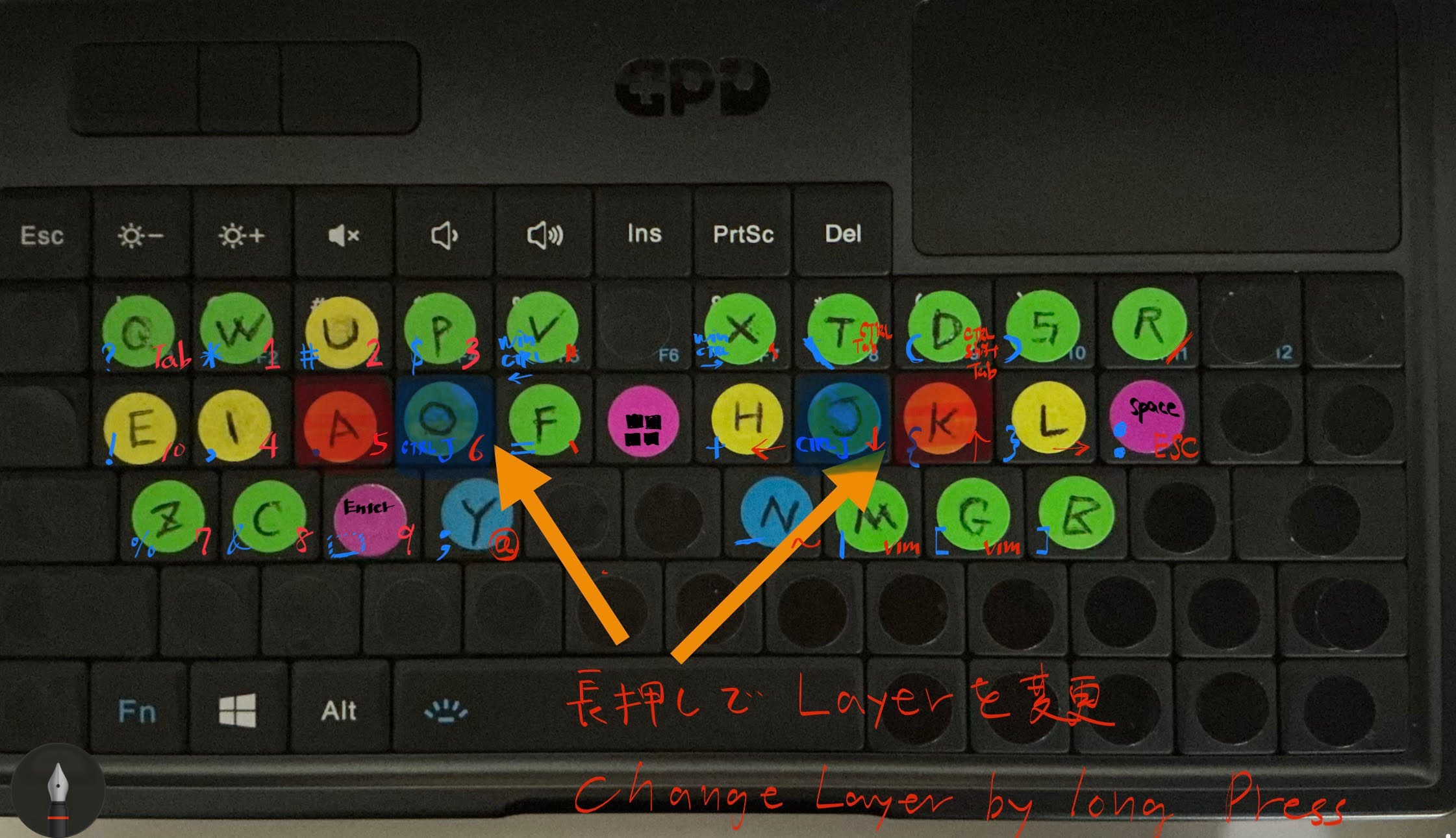
具体的には、yとnは長押しでCtrl、fとhは長押しでShiftとして機能するように設定しています。
参考までに、以前Macで使用していたKarabinerの設定はこちらです: gokurakujodo_karabiner_edn_v2.html
スクリプトの配置 (keybind_v3.ahk)
以下のスクリプトをスタートアップフォルダ (shell:startup) に配置します。
📂 keybind_v3.ahk (全文掲載)
#Requires AutoHotkey v2.0
; shell:startup
; --- 変数初期化 ---
; Dual Role機能を有効にするかどうかのフラグ(初期値: true = 有効)
global UseDualRole := true
global UsedAsModifier := false
; --- QMK-like Configuration ---
global TappingTerm := 200 ; ms
global IgnoreModTapInterrupt := true
GetWaitTime() {
return "T" . (TappingTerm / 1000)
}
; --- 切り替えショートカット ---
; Ctrl + Alt + k で、特殊設定をON/OFFします
^!k::
{
global UseDualRole
UseDualRole := !UseDualRole
MsgBox("Dual Role / Remap: " . (UseDualRole ? "ON (有効)" : "OFF (無効)"), "Mode Swi
tch", "T1")
}
; --- 除外アプリケーションの設定 ---
GroupAdd "TerminalEditors", "ahk_exe wezterm-gui.exe"
; GroupAdd "TerminalEditors", "ahk_exe WindowsTerminal.exe"
; ==========================================================
; キーマップ定義 (Dual Role / Mod-Tap)
; ★ UseDualRole が ON のときだけ有効になります
; ==========================================================
#HotIf UseDualRole
; --- Helper Function for Combinations ---
; Checks if any of the custom modifiers are held
; Modifiers:
; Left Hand: r, e, t, f, y
; Right Hand: u, i, o, j, y
; ----------------------------------------------------------
; Left Hand Targets
; ----------------------------------------------------------
; Physical '1' -> q
$*1::
{
global UsedAsModifier
if GetKeyState("i", "P") { ; Symbols
SendInput "?"
UsedAsModifier := true
return
}
if GetKeyState("o", "P") { ; Numbers/Tab
SendInput "{Tab}"
UsedAsModifier := true
return
}
if GetKeyState("u", "P") { ; Shift/Upper
SendInput "Q"
UsedAsModifier := true
return
}
if GetKeyState("j", "P") { ; Ctrl
SendInput "^q"
UsedAsModifier := true
return
}
if GetKeyState("y", "P") { ; Win (y)
SendInput "#q"
UsedAsModifier := true
return
}
SendInput "{Blind}q"
}
; Physical 'Tab' -> q (Duplicate of 1)
$*Tab::
{
global UsedAsModifier
if GetKeyState("i", "P") {
SendInput "?"
UsedAsModifier := true
return
}
if GetKeyState("o", "P") {
SendInput "{Tab}"
UsedAsModifier := true
return
}
if GetKeyState("u", "P") {
SendInput "Q"
UsedAsModifier := true
return
}
if GetKeyState("j", "P") {
SendInput "^q"
UsedAsModifier := true
return
}
if GetKeyState("y", "P") {
SendInput "#q"
UsedAsModifier := true
return
}
SendInput "{Blind}q"
}
; Physical 'q' -> e
$*q::
{
global UsedAsModifier
if GetKeyState("i", "P") {
SendInput "{!}"
UsedAsModifier := true
return
}
if GetKeyState("o", "P") {
SendInput "0"
UsedAsModifier := true
return
}
if GetKeyState("u", "P") {
SendInput "E"
UsedAsModifier := true
return
}
if GetKeyState("j", "P") { ; Not explicitly defined but consistent
SendInput "+{End}" ; Emacs line selection/end? Description says "Emacs style lin
e end (all selected)"
UsedAsModifier := true
return
}
if GetKeyState("y", "P") {
SendInput "#e"
UsedAsModifier := true
return
}
SendInput "{Blind}e"
}
; Physical 'w' -> i
$*w::
{
global UsedAsModifier
if GetKeyState("i", "P") {
SendInput ","
UsedAsModifier := true
return
}
if GetKeyState("o", "P") {
SendInput "4"
UsedAsModifier := true
return
}
if GetKeyState("u", "P") {
SendInput "I"
UsedAsModifier := true
return
}
if GetKeyState("j", "P") { ; Not explicitly defined but consistent
SendInput "^i"
UsedAsModifier := true
return
}
if GetKeyState("y", "P") {
SendInput "#i"
UsedAsModifier := true
return
}
SendInput "{Blind}i"
}
; Physical 'e' -> a (Acts as Modifier 'e' when held)
$*e::
{
global UsedAsModifier
UsedAsModifier := false
; --- Combinations (When acting as Target) ---
if GetKeyState("i", "P") {
SendInput "."
UsedAsModifier := true
return
}
if GetKeyState("o", "P") {
SendInput "5"
UsedAsModifier := true
return
}
if GetKeyState("u", "P") {
SendInput "A"
UsedAsModifier := true
return
}
if GetKeyState("j", "P") {
SendInput "{Home}" ; Emacs line start
UsedAsModifier := true
return
}
if GetKeyState("y", "P") {
SendInput "#a"
UsedAsModifier := true
return
}
; --- Mod-Tap Logic (When acting as Modifier) ---
if KeyWait("e", GetWaitTime()) {
if IgnoreModTapInterrupt and (A_PriorKey != "e")
SendInput "{Blind}a"
else if (!UsedAsModifier)
SendInput "{Blind}a"
}
else {
KeyWait "e"
if (!UsedAsModifier)
SendInput "{Blind}a"
}
}
; Physical 'r' -> o (Acts as Modifier 'r' when held)
$*r::
{
global UsedAsModifier
UsedAsModifier := false
; --- Combinations ---
if GetKeyState("i", "P") {
SendInput "^j" ; Ctrl+j
UsedAsModifier := true
return
}
if GetKeyState("o", "P") {
SendInput "6"
UsedAsModifier := true
return
}
if GetKeyState("u", "P") {
SendInput "O"
UsedAsModifier := true
return
}
if GetKeyState("j", "P") {
; Not explicitly defined
return
}
if GetKeyState("y", "P") {
SendInput "#o"
UsedAsModifier := true
return
}
; --- Mod-Tap ---
if KeyWait("r", GetWaitTime()) {
if IgnoreModTapInterrupt and (A_PriorKey != "r")
SendInput "{Blind}o"
else if (!UsedAsModifier)
SendInput "{Blind}o"
}
else {
KeyWait "r"
if (!UsedAsModifier)
SendInput "{Blind}o"
}
}
; Physical 't' -> f (Acts as Modifier 't' when held)
$*t::
{
global UsedAsModifier
UsedAsModifier := false
; --- Combinations ---
if GetKeyState("i", "P") {
SendInput "="
UsedAsModifier := true
return
}
if GetKeyState("o", "P") {
SendInput "``" ; Backtick
UsedAsModifier := true
return
}
if GetKeyState("u", "P") {
SendInput "F"
UsedAsModifier := true
return
}
if GetKeyState("j", "P") {
SendInput "^f"
UsedAsModifier := true
return
}
if GetKeyState("y", "P") {
SendInput "#f"
UsedAsModifier := true
return
}
; --- Mod-Tap ---
if KeyWait("t", GetWaitTime()) {
if IgnoreModTapInterrupt and (A_PriorKey != "t")
SendInput "{Blind}f"
else if (!UsedAsModifier)
SendInput "{Blind}f"
}
else {
KeyWait "t"
if (!UsedAsModifier)
SendInput "{Blind}f"
}
}
; Physical 'f' -> y (Acts as Modifier 'f' [Ctrl-like] when held)
$*f::
{
global UsedAsModifier
UsedAsModifier := false
; --- Combinations ---
if GetKeyState("i", "P") {
SendInput ";"
UsedAsModifier := true
return
}
if GetKeyState("o", "P") {
SendInput "@"
UsedAsModifier := true
return
}
if GetKeyState("u", "P") {
SendInput "Y"
UsedAsModifier := true
return
}
if GetKeyState("j", "P") {
SendInput "^y"
UsedAsModifier := true
return
}
if GetKeyState("y", "P") {
SendInput "#y"
UsedAsModifier := true
return
}
; --- Mod-Tap (Hold = Ctrl Modifier) ---
if KeyWait("f", GetWaitTime()) {
if (UsedAsModifier)
return
if IgnoreModTapInterrupt and (A_PriorKey != "f")
SendInput "{Blind}y"
else
SendInput "{Blind}y"
}
else {
KeyWait "f"
if (!UsedAsModifier)
SendInput "{Blind}y"
}
}
; Physical 'd' -> enter
$*d::
{
global UsedAsModifier
if GetKeyState("i", "P") {
SendInput "_"
UsedAsModifier := true
return
}
if GetKeyState("o", "P") {
SendInput "9"
UsedAsModifier := true
return
}
if GetKeyState("u", "P") {
SendInput "+{Enter}"
UsedAsModifier := true
return
}
if GetKeyState("j", "P") {
SendInput "^{Enter}"
UsedAsModifier := true
return
}
if GetKeyState("y", "P") {
SendInput "#{Enter}"
UsedAsModifier := true
return
}
SendInput "{Enter}"
}
; Physical 's' -> c
$*s::
{
global UsedAsModifier
if GetKeyState("i", "P") {
SendInput "{&}"
UsedAsModifier := true
return
}
if GetKeyState("o", "P") {
SendInput "8"
UsedAsModifier := true
return
}
if GetKeyState("u", "P") {
SendInput "C"
UsedAsModifier := true
return
}
if GetKeyState("j", "P") {
SendInput "^c"
UsedAsModifier := true
return
}
if GetKeyState("y", "P") {
SendInput "#c"
UsedAsModifier := true
return
}
SendInput "{Blind}c"
}
; Physical 'a' -> z
$*a::
{
global UsedAsModifier
if GetKeyState("i", "P") {
SendInput "{%}"
UsedAsModifier := true
return
}
if GetKeyState("o", "P") {
SendInput "7"
UsedAsModifier := true
return
}
if GetKeyState("u", "P") {
SendInput "Z"
UsedAsModifier := true
return
}
if GetKeyState("j", "P") {
SendInput "^z"
UsedAsModifier := true
return
}
if GetKeyState("y", "P") {
SendInput "#z"
UsedAsModifier := true
return
}
SendInput "{Blind}z"
}
; Physical '2' -> w
$*2::
{
global UsedAsModifier
if GetKeyState("i", "P") {
SendInput "{*}"
UsedAsModifier := true
return
}
if GetKeyState("o", "P") {
SendInput "1"
UsedAsModifier := true
return
}
if GetKeyState("u", "P") {
SendInput "W"
UsedAsModifier := true
return
}
if GetKeyState("j", "P") {
SendInput "^w"
UsedAsModifier := true
return
}
if GetKeyState("y", "P") {
SendInput "#w"
UsedAsModifier := true
return
}
SendInput "{Blind}w"
}
; Physical '3' -> u
$*3::
{
global UsedAsModifier
if GetKeyState("i", "P") {
SendInput "{#}"
UsedAsModifier := true
return
}
if GetKeyState("o", "P") {
SendInput "2"
UsedAsModifier := true
return
}
if GetKeyState("u", "P") {
SendInput "U"
UsedAsModifier := true
return
}
if GetKeyState("j", "P") {
SendInput "^u"
UsedAsModifier := true
return
}
if GetKeyState("y", "P") {
SendInput "#u" ; Accessibilty
UsedAsModifier := true
return
}
SendInput "{Blind}u"
}
; Physical '4' -> p
$*4::
{
global UsedAsModifier
if GetKeyState("i", "P") {
SendInput "$"
UsedAsModifier := true
return
}
if GetKeyState("o", "P") {
SendInput "3"
UsedAsModifier := true
return
}
if GetKeyState("u", "P") {
SendInput "P"
UsedAsModifier := true
return
}
if GetKeyState("j", "P") {
SendInput "^p"
UsedAsModifier := true
return
}
if GetKeyState("y", "P") {
SendInput "#p"
UsedAsModifier := true
return
}
SendInput "{Blind}p"
}
; Physical '5' -> v
$*5::
{
global UsedAsModifier
if GetKeyState("i", "P") {
SendInput "#^{Left}" ; Win+Ctrl+Left
UsedAsModifier := true
return
}
if GetKeyState("o", "P") {
SendInput "{DoubleQuote}" ; "
UsedAsModifier := true
return
}
if GetKeyState("u", "P") {
SendInput "V"
UsedAsModifier := true
return
}
if GetKeyState("j", "P") {
SendInput "^v"
UsedAsModifier := true
return
}
if GetKeyState("y", "P") {
SendInput "#v"
UsedAsModifier := true
return
}
SendInput "{Blind}v"
}
; ----------------------------------------------------------
; Right Hand Targets
; ----------------------------------------------------------
; Physical '-' -> r
$*-::
{
global UsedAsModifier
if GetKeyState("r", "P") {
SendInput ";"
UsedAsModifier := true
return
}
if GetKeyState("e", "P") {
SendInput "/"
UsedAsModifier := true
return
}
if GetKeyState("t", "P") {
SendInput "R"
UsedAsModifier := true
return
}
if GetKeyState("f", "P") {
SendInput "^r"
UsedAsModifier := true
return
}
if GetKeyState("y", "P") {
SendInput "#r"
UsedAsModifier := true
return
}
SendInput "{Blind}r"
}
; Physical '[' -> space
$*[
{
global UsedAsModifier
if GetKeyState("r", "P") {
SendInput ":"
UsedAsModifier := true
return
}
if GetKeyState("e", "P") {
SendInput "{Esc}"
UsedAsModifier := true
return
}
if GetKeyState("f", "P") {
SendInput "^{Space}"
UsedAsModifier := true
return
}
if GetKeyState("y", "P") {
SendInput "#{Space}"
UsedAsModifier := true
return
}
SendInput "{Blind}{Space}"
}
; Physical 'p' -> l
$*p::
{
global UsedAsModifier
if GetKeyState("r", "P") {
SendInput "{}}" ; }}
UsedAsModifier := true
return
}
if GetKeyState("e", "P") {
SendInput "{Right}"
UsedAsModifier := true
return
}
if GetKeyState("t", "P") {
SendInput "L"
UsedAsModifier := true
return
}
if GetKeyState("f", "P") {
SendInput "^l"
UsedAsModifier := true
return
}
if GetKeyState("y", "P") {
SendInput "#l"
UsedAsModifier := true
return
}
SendInput "{Blind}l"
}
; Physical 'o' -> k (Acts as Modifier 'o' when held)
$*o::
{
global UsedAsModifier
UsedAsModifier := false
; --- Combinations ---
if GetKeyState("r", "P") {
SendInput "{Text}{" ; {
UsedAsModifier := true
return
}
if GetKeyState("e", "P") {
SendInput "{Up}"
UsedAsModifier := true
return
}
if GetKeyState("t", "P") {
SendInput "K"
UsedAsModifier := true
return
}
if GetKeyState("f", "P") {
SendInput "^k"
UsedAsModifier := true
return
}
if GetKeyState("y", "P") {
SendInput "#k"
UsedAsModifier := true
return
}
; --- Mod-Tap ---
if KeyWait("o", GetWaitTime()) {
if IgnoreModTapInterrupt and (A_PriorKey != "o")
SendInput "{Blind}k"
else if (!UsedAsModifier)
SendInput "{Blind}k"
}
else {
KeyWait "o"
if (!UsedAsModifier)
SendInput "{Blind}k"
}
}
; Physical 'i' -> j (Acts as Modifier 'i' when held)
$*i::
{
global UsedAsModifier
UsedAsModifier := false
; --- Combinations ---
if GetKeyState("r", "P") {
SendInput "^j"
UsedAsModifier := true
return
}
if GetKeyState("e", "P") {
SendInput "{Down}"
UsedAsModifier := true
return
}
if GetKeyState("t", "P") {
SendInput "J"
UsedAsModifier := true
return
}
if GetKeyState("f", "P") {
SendInput "^j"
UsedAsModifier := true
return
}
if GetKeyState("y", "P") {
SendInput "#j"
UsedAsModifier := true
return
}
; --- Mod-Tap ---
if KeyWait("i", GetWaitTime()) {
if IgnoreModTapInterrupt and (A_PriorKey != "i")
SendInput "{Blind}j"
else if (!UsedAsModifier)
SendInput "{Blind}j"
}
else {
KeyWait "i"
if (!UsedAsModifier)
SendInput "{Blind}j"
}
}
; Physical 'u' -> h (Acts as Modifier 'u' when held)
$*u::
{
global UsedAsModifier
UsedAsModifier := false
; --- Combinations ---
if GetKeyState("r", "P") {
SendInput "{+}"
UsedAsModifier := true
return
}
if GetKeyState("e", "P") {
SendInput "{Left}"
UsedAsModifier := true
return
}
if GetKeyState("t", "P") {
SendInput "H"
UsedAsModifier := true
return
}
if GetKeyState("f", "P") {
SendInput "{Backspace}"
UsedAsModifier := true
return
}
if GetKeyState("y", "P") {
SendInput "#h"
UsedAsModifier := true
return
}
; --- Mod-Tap ---
if KeyWait("u", GetWaitTime()) {
if IgnoreModTapInterrupt and (A_PriorKey != "u")
SendInput "{Blind}h"
else if (!UsedAsModifier)
SendInput "{Blind}h"
}
else {
KeyWait "u"
if (!UsedAsModifier)
SendInput "{Blind}h"
}
}
; Physical '7' -> x
$*7::
{
global UsedAsModifier
if GetKeyState("r", "P") {
SendInput "#^{Right}" ; Win+Ctrl+Right
UsedAsModifier := true
return
}
if GetKeyState("e", "P") {
SendInput "'" ; Single Quote
UsedAsModifier := true
return
}
if GetKeyState("t", "P") {
SendInput "X"
UsedAsModifier := true
return
}
if GetKeyState("f", "P") {
SendInput "^x" ; Ctrl+x
UsedAsModifier := true
return
}
if GetKeyState("y", "P") {
SendInput "#x" ; Win+x
UsedAsModifier := true
return
}
SendInput "{Blind}x"
}
; Physical '8' -> t
$*8::
{
global UsedAsModifier
if GetKeyState("r", "P") {
SendInput "\"
UsedAsModifier := true
return
}
if GetKeyState("e", "P") {
; none
return
}
if GetKeyState("t", "P") {
SendInput "T"
UsedAsModifier := true
return
}
if GetKeyState("f", "P") {
SendInput "^t"
UsedAsModifier := true
return
}
if GetKeyState("y", "P") {
SendInput "#t"
UsedAsModifier := true
return
}
SendInput "{Blind}t"
}
; Physical '9' -> d
$*9::
{
global UsedAsModifier
if GetKeyState("r", "P") {
SendInput "{("
UsedAsModifier := true
return
}
if GetKeyState("e", "P") {
SendInput "^{ + }" ; Ctrl + +
UsedAsModifier := true
return
}
if GetKeyState("t", "P") {
SendInput "D"
UsedAsModifier := true
return
}
if GetKeyState("f", "P") {
SendInput "^d"
UsedAsModifier := true
return
}
if GetKeyState("y", "P") {
SendInput "#d"
UsedAsModifier := true
return
}
SendInput "{Blind}d"
}
; Physical '0' -> s
$*0::
{
global UsedAsModifier
if GetKeyState("r", "P") {
SendInput ")}"
UsedAsModifier := true
return
}
if GetKeyState("e", "P") {
SendInput "^{ - }" ; Ctrl + -
UsedAsModifier := true
return
}
if GetKeyState("t", "P") {
SendInput "S"
UsedAsModifier := true
return
}
if GetKeyState("f", "P") {
SendInput "^s"
UsedAsModifier := true
return
}
if GetKeyState("y", "P") {
SendInput "#s"
UsedAsModifier := true
return
}
SendInput "{Blind}s"
}
; Physical 'j' -> n (Acts as Modifier 'j' when held)
$*j::
{
global UsedAsModifier
UsedAsModifier := false
; --- Combinations ---
if GetKeyState("r", "P") {
SendInput "-"
UsedAsModifier := true
return
}
if GetKeyState("e", "P") {
SendInput "{~}"
UsedAsModifier := true
return
}
if GetKeyState("t", "P") {
SendInput "N"
UsedAsModifier := true
return
}
if GetKeyState("f", "P") {
SendInput "^n"
UsedAsModifier := true
return
}
if GetKeyState("y", "P") {
SendInput "#n"
UsedAsModifier := true
return
}
; --- Mod-Tap ---
if KeyWait("j", GetWaitTime()) {
if IgnoreModTapInterrupt and (A_PriorKey != "j")
SendInput "{Blind}n"
else if (!UsedAsModifier)
SendInput "{Blind}n"
}
else {
KeyWait "j"
if (!UsedAsModifier)
SendInput "{Blind}n"
}
}
; Physical 'k' -> m
$*k::
{
global UsedAsModifier
if GetKeyState("r", "P") {
SendInput "{|}"
UsedAsModifier := true
return
}
if GetKeyState("e", "P") {
SendInput " {Space}tp"
UsedAsModifier := true
return
}
if GetKeyState("t", "P") {
SendInput "M"
UsedAsModifier := true
return
}
if GetKeyState("f", "P") {
SendInput "^m"
UsedAsModifier := true
return
}
if GetKeyState("y", "P") {
SendInput "#m"
UsedAsModifier := true
return
}
SendInput "{Blind}m"
}
; Physical 'l' -> g
$*l::
{
global UsedAsModifier
if GetKeyState("r", "P") {
SendInput "["
UsedAsModifier := true
return
}
if GetKeyState("e", "P") {
SendInput " {Space}tn"
UsedAsModifier := true
return
}
if GetKeyState("t", "P") {
SendInput "G"
UsedAsModifier := true
return
}
if GetKeyState("f", "P") {
SendInput "^g"
UsedAsModifier := true
return
}
if GetKeyState("y", "P") {
SendInput "#g"
UsedAsModifier := true
return
}
SendInput "{Blind}g"
}
; Physical ';' -> b
$*;
{
global UsedAsModifier
if GetKeyState("r", "P") {
SendInput "]"
UsedAsModifier := true
return
}
if GetKeyState("e", "P") {
; none
return
}
if GetKeyState("t", "P") {
SendInput "B"
UsedAsModifier := true
return
}
if GetKeyState("f", "P") {
SendInput "^b"
UsedAsModifier := true
return
}
if GetKeyState("y", "P") {
SendInput "#b"
UsedAsModifier := true
return
}
SendInput "{Blind}b"
}
; --- Physical 'y' acts as Modifier 'y' (Win) ---
$*y::
{
global UsedAsModifier
UsedAsModifier := false
; y tap behavior: y (default)
; Hold behavior: Acts as 'y' modifier (Windows Key layer)
if KeyWait("y", GetWaitTime()) {
if (UsedAsModifier)
return
; Tap -> y
if IgnoreModTapInterrupt and (A_PriorKey != "y")
SendInput "{Blind}y"
else
SendInput "{Blind}y"
}
else {
KeyWait "y"
if (!UsedAsModifier)
SendInput "{Blind}y"
}
}
#HotIf ; End UseDualRoleStep 6: Obsidian & Gemini CLI
6.1 Obsidianのマウスズレ修正
WSLg環境でElectron製アプリ(Obsidianなど)を最大化すると、画面が下方向にずれ、マウスポインターと実際のクリック位置がずれる問題が発生します。これはXWaylandとの相性問題です。
解決策として ObsidianをWSL環境で使ってみた|Hiroaki - note の記事が大変参考になりました。感謝いたします。
詳細な修正手順 (VBScript作成)
起動オプション --ozone-platform-hint=wayland を付与することで解決します。以下の手順でショートカットを作成すると便利です。
- コマンドライン確認: まずはターミナルで以下を実行し、正常に動作するか確認します。
obsidian --ozone-platform-hint=wayland - VBScript作成: 毎回コマンドを打つのは手間なので、以下の内容で
Obsidian.vbsを作成します。
※Ubuntuの部分は使用しているディストリビューション名に変更してください。CreateObject("Wscript.Shell").Run "wsl -d Ubuntu -e bash -l -c \"obsidian --ozone-platform-hint=wayland\"", 0, False - スタートメニュー登録: 作成したファイルを以下のフォルダに配置(またはショートカットを作成)すると、Windowsのスタートメニューから起動できます。
C:\Users\{{ユーザ名}}\AppData\Roaming\Microsoft\Windows\Start Menu\Programs
6.2 WSL Utilities (wslview)
WSL内からWindowsのブラウザを開くために wslview を導入しました(init_linux.shに含まれています)。
6.3 Gemini CLI
ターミナル完結のAI環境としてGemini CLIを導入。以下の記事を参考にしました。
結論
以上の手順により、GPD Micro PC 2という小型端末の中に愛用してきたMacBookとほぼ同じ開発環境を構築することに成功しました!
環境構築が面白すぎて、半月ほど消失しました。。。
電車の隙間時間などで、失った時間を回収していきたいと思います!