Introduction
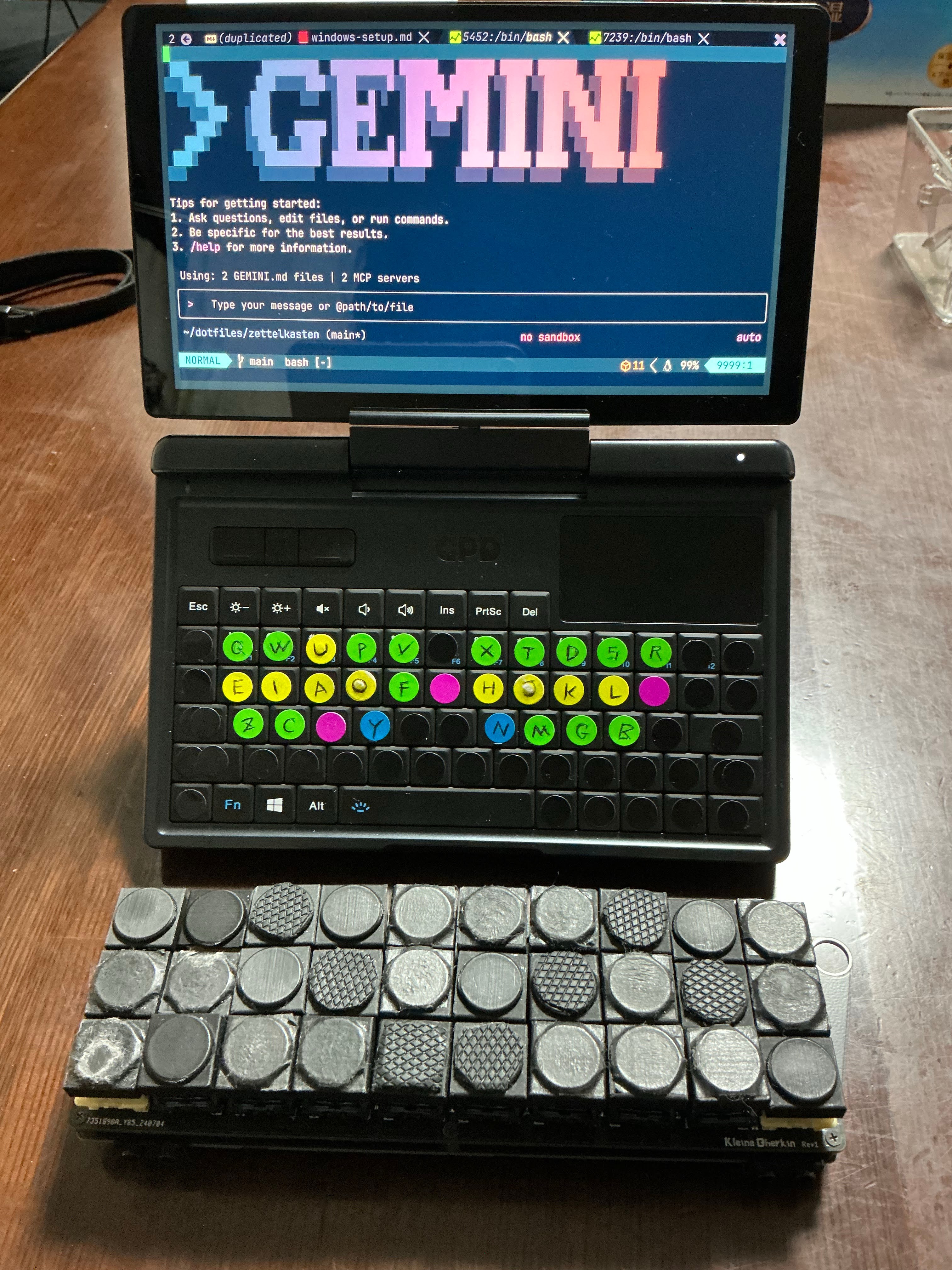
This article is a memorandum of my journey to build "a Vim environment that fits in my pocket and is ready to code instantly."
Using the ultra-compact GPD Micro PC 2, I initially tried a native Linux installation but faced startup times of over 30 seconds. A dev environment that isn't ready the moment inspiration strikes is fatal for a mobile device.
The solution I arrived at was Windows 11 + WSL2. By combining it with WezTerm, I achieved instant startup. I introduced the Onishi layout using AutoHotkey, enabling me to operate Vim and develop from anywhere!
Step 1: Foundation (WSL2 & WezTerm)
WSL2 (Windows Subsystem for Linux 2) allows running a Linux kernel on Windows with near-native performance. It installs with a single command wsl --install and integrates seamlessly with the Windows filesystem.
For beginners, the article Installing and Using WSL2 Ubuntu on Windows 11 (Anyone can do it) is highly recommended. It provides a step-by-step guide with images, allowing even those unfamiliar with terminal operations to set up an Ubuntu environment easily. If you are unsure about preparing the WSL environment required for this guide, I suggest reading this article first.
Installing WezTerm
WezTerm is chosen for its speed and configurability. We use a bridge configuration to load the settings directly from WSL.
- Windows Side: Create
C:\Users\{{Username}}\ .wezterm.luawith the bridge code. - WSL Side: Place the actual config at
~/dotfiles/windows/.wezterm_windows.lua.
📂 Windows .wezterm.lua (Bridge)
-- Change 'Ubuntu' to your distribution name
-- Note: Use forward slashes (/) even on Windows to avoid issues
return dofile("//wsl$/Ubuntu/home/{{Username}}/dotfiles/windows/.wezterm_windows.lua")
📂 WSL .wezterm_windows.lua (Actual Config)
local wezterm = require("wezterm")
local config = wezterm.config_builder()

-- 1. Font Settings
config.font = wezterm.font_with_fallback({
        "JetBrains Mono", -- WezTerm built-in
        "Meiryo", -- Windows standard Japanese font
        "Segoe UI Emoji", -- Windows Emoji
})
config.font_size = 16
config.enable_tab_bar = false

-- 2. Window Decorations (No Title Bar)
config.window_decorations = "RESIZE"
config.window_background_opacity = 0.8

-- 3. Blur Effect (Windows 10/11)
config.win32_system_backdrop = "Acrylic"

-- 4. Colors
config.colors = {
        foreground = "#CBE0F0",
        background = "#011423",
        cursor_bg = "#47FF9C",
        cursor_border = "#47FF9C",
        cursor_fg = "#011423",
        selection_bg = "#033259",
        selection_fg = "#CBE0F0",
        ansi = { "#214969", "#E52E2E", "#44FFB1", "#FFE073", "#0FC5ED", "#a277ff", "#24E
AF7", "#24EAF7" },
        brights = { "#214969", "#E52E2E", "#44FFB1", "#FFE073", "#A277FF", "#a277ff", "#
24EAF7", "#24EAF7" },
}

-- 5. Default Shell: Launch WSL (Ubuntu) in Home
config.default_prog = { "wsl.exe", "--cd", "~" }
-- PowerShell 7
-- config.default_prog = { "pwsh.exe" }

return config
Step 2: Linux Environment Init (init_linux.sh)
We created init_linux.sh to automate the WSL setup. This script installs critical components:
List of Major Components Installed
- Dev Tools: build-essential, git, curl, unzip
- Shell: zsh
- Package Manager: Homebrew (Linuxbrew)
- WSL Integration: wslu (wslview)
- Apps: Obsidian (with Japanese support)
- Locale: en_US.UTF-8 (for PostgreSQL fix)
📂 init_linux.sh (Full Source)
#!/bin/bash

# WSL/Linux Environment Setup Script
# Stop on error
set -e

echo "======================================="
echo "|---- Locale Generation (Fix for Postgres) ----|"
echo "======================================="
# Generate en_US.UTF-8 locale for PostgreSQL etc.
if [ -f /etc/debian_version ]; then
    sudo apt-get update
    sudo apt-get install -y locales
    if ! grep -q "^en_US.UTF-8 UTF-8" /etc/locale.gen; then
        echo "Generating en_US.UTF-8 locale..."
        sudo locale-gen en_US.UTF-8
        sudo update-locale LANG=en_US.UTF-8
        export LANG=en_US.UTF-8
    else
        echo "en_US.UTF-8 locale already exists."
    fi
fi
echo -e "\n --------------- END ----------------"


echo "======================================="
echo "|---- Base Dependencies (apt) ----|"
echo "======================================="
# Assuming Debian/Ubuntu
if [ -f /etc/debian_version ]; then
    # Install zsh here
    if ! dpkg -s build-essential zsh >/dev/null 2>&1; then
        read -p "Install build-essential, zsh, etc? (y/n) " Answer < /dev/t
ty
        case ${Answer} in
            y|Y)
                sudo apt-get update
                sudo apt-get install -y build-essential curl file git unzip zsh
                ;;;
            n|N)
                echo "Skipped apt install" ;;;
        esac
    else
        echo "build-essential, zsh already installed"
    fi
else
    echo "Skipped apt commands (Not Debian/Ubuntu)."
fi
echo -e "\n --------------- END ----------------"

echo "======================================="
echo "|----------- wslu (WSL Utilities) -----------|"
echo "======================================="
if [ -f /etc/debian_version ]; then
    if ! command -v wslview >/dev/null 2>&1; then
        read -p "Install wslu (wslview)? (y/n) " Answer < /dev/tty
        case ${Answer} in
            y|Y)
                # If add-apt-repository is missing
                if ! command -v add-apt-repository >/dev/null 2>&1; then
                     sudo apt-get install -y software-properties-common
                fi
                sudo add-apt-repository ppa:wslutilities/wslu -y
                sudo apt-get update
                sudo apt-get install -y wslu
                ;;;
            n|N)
                echo "Skipped wslu install" ;;;
        esac
    else
        echo "wslu already installed"
    fi
fi
echo -e "\n --------------- END ----------------"

echo "======================================="
echo "|----------- Obsidian (WSL) -----------|"
echo "======================================="
if [ -f /etc/debian_version ]; then
    read -p "Install Obsidian (and Japanese setup)? (y/n) " Answer < /dev/	ty
    case ${Answer} in
        y|Y)
            echo "Installing Obsidian..."
            # Get latest deb URL from GitHub API
            deb_link=$(curl -s https://api.github.com/repos/obsidianmd/obsidian-releases
/releases/latest | grep "browser_download_url" | grep "amd64.deb" | cut -d '"' -f 4)
            if [ -z "$deb_link" ]; then
                echo "Could not get Obsidian download link."
            else
                wget "$deb_link" -O obsidian_latest.deb
                sudo dpkg -i ./obsidian_latest.deb || true
                sudo apt-get install -f -y
                rm ./obsidian_latest.deb
                echo "Obsidian installed."
            fi

            echo "Installing Japanese fonts, input support (IBus + Mozc), and dependenci
es..."
            sudo apt-get update
            sudo apt-get install -y libasound2t64 fonts-noto-cjk fonts-noto-color-emoji
fonts-ipafont-gothic fonts-ipafont-mincho ibus ibus-mozc

            # Configure env vars
            if ! grep -q "GTK_IM_MODULE=ibus" "$HOME/.bashrc"; then
                echo 'export GTK_IM_MODULE=ibus' >> "$HOME/.bashrc"
            fi
            if ! grep -q "QT_IM_MODULE=ibus" "$HOME/.bashrc"; then
                echo 'export QT_IM_MODULE=ibus' >> "$HOME/.bashrc"
            fi
            if ! grep -q "XMODIFIERS=@im=ibus" "$HOME/.bashrc"; then
                echo 'export XMODIFIERS=@im=ibus' >> "$HOME/.bashrc"
            fi
            # For zshrc
            if [ -f "$HOME/.zshrc" ]; then
                if ! grep -q "GTK_IM_MODULE=ibus" "$HOME/.zshrc"; then
                    echo 'export GTK_IM_MODULE=ibus' >> "$HOME/.zshrc"
                fi
                if ! grep -q "QT_IM_MODULE=ibus" "$HOME/.zshrc"; then
                    echo 'export QT_IM_MODULE=ibus' >> "$HOME/.zshrc"
                fi
                if ! grep -q "XMODIFIERS=@im=ibus" "$HOME/.zshrc"; then
                    echo 'export XMODIFIERS=@im=ibus' >> "$HOME/.zshrc"
                fi
            fi
            echo "Japanese environment setup complete."
            ;;;
        n|N)
            echo "Skipped Obsidian install" ;;;
    esac
fi
echo -e "\n --------------- END ----------------"

echo "======================================="
echo "|----------- Homebrew -----------|"
echo "======================================="
# Check Linuxbrew
if ! command -v brew >/dev/null 2>&1; then
  read -p "Install Homebrew (Linuxbrew)? (y/n) " Answer < /dev/tty
  case ${Answer} in
    y|Y)
      /bin/bash -c "$(curl -fsSL https://raw.githubusercontent.com/Homebrew/install/HEAD
/install.sh)"

      # Linuxbrew Path
      test -d ~/.linuxbrew && eval "$(~/.linuxbrew/bin/brew shellenv)"
      test -d /home/linuxbrew/.linuxbrew && eval "$(/home/linuxbrew/.linuxbrew/bin/brew
shellenv)"

      # Add to shell profile (zsh/bash)
      if [ -f "$HOME/.bashrc" ]; then
        if ! grep -q "brew shellenv" "$HOME/.bashrc"; then
            echo "eval \"$(
brew --prefix)/bin/brew shellenv)\"" >> "$HOME/.bashrc"
        fi
      fi
      if [ -f "$HOME/.zprofile" ]; then
        if ! grep -q "brew shellenv" "$HOME/.zprofile"; then
            echo "eval \"$(
brew --prefix)/bin/brew shellenv)\"" >> "$HOME/.zprofile"
        fi
      elif [ -f "$HOME/.zshrc" ]; then
         if ! grep -q "brew shellenv" "$HOME/.zshrc"; then
            echo "eval \"$(
brew --prefix)/bin/brew shellenv)\"" >> "$HOME/.zshrc"
        fi
      fi
      ;;;
    n|N)
      echo "Skipped Homebrew install" ;;;
  esac
else
  echo "Homebrew is already installed"
  test -d ~/.linuxbrew && eval "$(~/.linuxbrew/bin/brew shellenv)"
  test -d /home/linuxbrew/.linuxbrew && eval "$(/home/linuxbrew/.linuxbrew/bin/brew
shel
llev)"
fi
echo -e "\n --------------- END ----------------"

echo -e "\n"
echo "======================================="
echo "|----------- symbolic link -----------|"
echo "======================================="
read -p "Apply symbolic links? (y/n) " Answer < /dev/tty
case ${Answer} in
  y|Y)
        # Link dotfiles
        for f in .??*; do
            [ "$f" = ".git" ] && continue
            [ "$f" = ".DS_Store" ] && continue

            ln -snfv ~/dotfiles/"$f" ~
        done
    ;;;
  n|N)
    echo "Skipped symbolic links" ;;;
esac
echo -e "\n --------------- END ----------------"


echo "======================================="
echo "|--------- create my ci dev env------------|"
echo "======================================="
read -p "Create my ci dev env? (y/n) " Answer < /dev/tty
case ${Answer} in
    y|Y)
        # mac specific removed (yabai, skhd, karabiner, fonts, GUI apps)

        brew install neovim
        brew install ripgrep
        brew install jesseduffield/lazygit/lazygit

        brew install go
        brew install tree
        brew install gh

        brew install nodebrew
        brew install curl
        brew install deno
        brew install docker
        brew install docker-compose
        brew install zsh-completions
        brew install direnv
        brew install pyenv
        brew install nvm

        brew install lynx
        brew install luarocks
        brew install wget
        brew install rust
        brew install composer
        brew install php
        brew install openjdk
        brew install julia
        # goku is mac only (karabiner)
        brew install mysql@8.0
        brew install postgresql@16

        # Fix for Postgres Locale issue if it failed previously
        brew postinstall postgresql@16 || true

        brew install node
        # font-meslo-lg-nerd-font is GUI/System font

        # Common tools & dependencies
        brew install bash
        brew install fish
        brew install fd
        brew install jq
        brew install make
        brew install pkgconf
        brew install python@3.12
        brew install python@3.13
        brew install sqlite
        brew install xz
        brew install zlib
        brew install boost
        brew install protobuf@29
        brew install openssl@3
        brew install llvm
        brew install autoconf
        brew install automake
        brew install libtool
        brew install gettext
        brew install ca-certificates
        brew install unixodbc
        brew install webp
        brew install tree-sitter
        brew install pipx
        brew install pillow
        # brew install pngpaste # Mac only
        brew install stylua
        brew install uv
        brew install awscli

        # brew install mcp-proxy # Check if needed

        # GUI Apps Removed (wezterm, karabiner, postman, chatgpt, raycast, obsidian, cod
ex, aquaskk)

        mkdir -p ~/.nvm

        npm install -g prettier eslint_d
        ;;;
    n|N)
        echo "Skipped installation" ;;;
esac
echo -e "\n --------------- END ----------------"


echo "======================================="
echo "|----------- ZSH Setup -----------|"
echo "======================================="
# Check default shell
if [ "$SHELL" != "$(which zsh)" ]; then
    read -p "Change default shell to zsh? (y/n) " Answer < /dev/tty
    case ${Answer} in
        y|Y)
            chsh -s "$(which zsh)"
            echo "Default shell changed. Effective after logout."
            ;;;
        n|N)
            echo "Skipped shell change." ;;;
    esac
fi
Step 3: Neovim & Clipboard Integration
We use win32yank.exe to copy text from Neovim in WSL to the Windows clipboard.
3.1 Install win32yank
Download win32yank.zip from GitHub.
Detailed Steps (Unzip, Move, Path)
- Download the latest
win32yank-x64.zipfrom the link above. - Right-click the zip file in Explorer and select "Extract All".
- Open your WSL terminal and execute the following commands to configure it.
# 1. Create bin directory and move the file
mkdir -p ~/bin
# (Note: Adjust the source path according to your environment)
mv /mnt/c/Users/{{Username}}/Downloads/win32yank-x64/win32yank.exe ~/bin/

# 2. Grant execution permissions
cd ~/bin
chmod +x win32yank.exe

# 3. Update Path (.bashrc or .zshrc)
echo 'export PATH=$HOME/bin:$PATH' >> ~/.bashrc
source ~/.bashrc

# 4. Verify
which win32yank.exe
3.2 Neovim Configuration (Lua)
Add the following to your Neovim config (init.lua) to enable synchronization with the Windows clipboard.
📂 wsl.lua (Neovim Config)
if vim.fn.has("wsl") == 1 then
    -- Use win32yank.exe
    vim.g.clipboard = {
        name = "win32yank",
        copy = {
            ["+"] = "win32yank.exe -i --crlf",
            ["*" ] = "win32yank.exe -i --crlf",
        },
        paste = {
            ["+"] = "win32yank.exe -o --lf",
            ["*" ] = "win32yank.exe -o --lf",
        },
        cache_enabled = 0,
    }

    -- Enable sync
    vim.opt.clipboard = "unnamedplus"
end
Step 4: Windows Troubleshooting & QMK
4.1 Windows Update Nightmare
I was saved from this desperate situation by the following video tutorial. It explained the In-place Upgrade process very clearly. I am truly grateful.
【Windows 11】Fixing Windows Update Failure after 25H2 (YouTube)
4.2 Japanese Input (CorvusSKK)
Installed CorvusSKK for Vim-like Japanese input.
- Configured Google Japanese Input API as a dictionary server for better accuracy.
- Unified key toggles with Mac standards.
The article Recommended Settings and Usage for CorvusSKK was extremely helpful during setup. Special thanks to the author.
4.3 DIY Keyboard (QMK/Vial) Strategy
When using an external keyboard, QMK layers were optimized to unify Mac/Win operations.
- Issue: Higher layers mask lower layers in QMK. Layer 6 masked key toggles on Layer 1.
- Solution: Reorganized layers.
- Layer 1: Mac Base
- Layer 2: Windows Base (Ctrl mapped to Cmd position)
- Layer 3/4: Function layers (Moved higher to be accessible from both bases)
- Used TG2 key to toggle between Layer 1 and 2.
Step 5: Implementing Onishi Layout (for Vim) with AutoHotkey
To comfortably use the GPD Micro PC 2's built-in keyboard, I implemented Home Row Mods using AutoHotkey v2. This allows modifier keys (Ctrl/Shift) to be triggered by holding home row keys.
Since the GPD Micro PC 2 relies on thumb typing, standard keyboard layouts significantly slow down input speed. By introducing an Onishi-like layout optimized for alternating hand usage, I achieved fast and comfortable typing even with thumbs. This adaptation was essential.
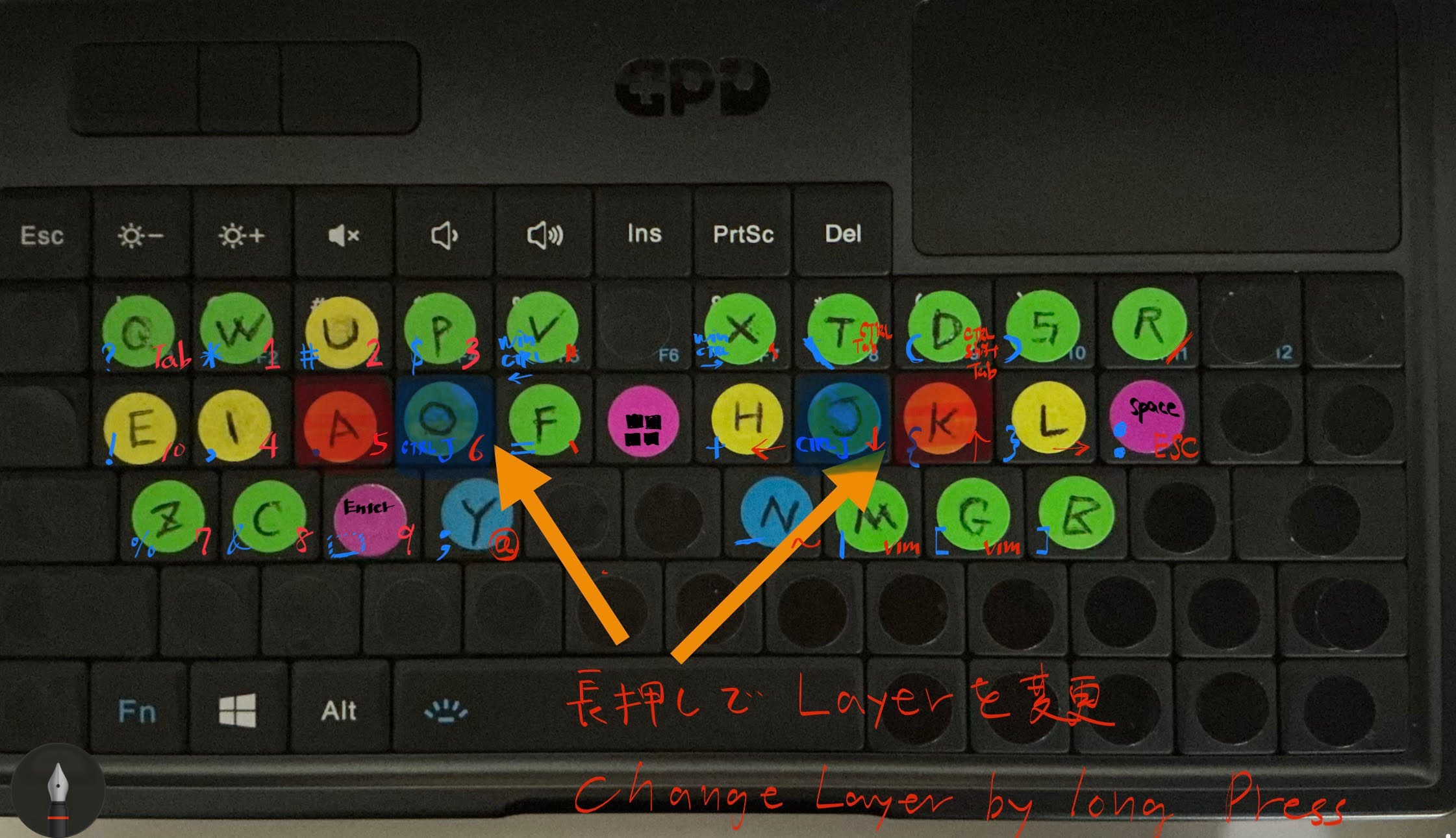
Specifically, holding 'y' or 'n' acts as Ctrl, and holding 'f' or 'h' acts as Shift.
For reference, here is the Karabiner configuration I previously used on Mac: gokurakujodo_karabiner_edn_v2.html
Script Deployment (keybind_v3.ahk)
Place this script in your Startup folder (shell:startup).
📂 keybind_v3.ahk (Full Source)
#Requires AutoHotkey v2.0
; shell:startup
; --- Variable Init ---
; Flag for Dual Role feature (Default: true = Enabled)
global UseDualRole := true
global UsedAsModifier := false
; --- QMK-like Configuration ---
global TappingTerm := 200 ; ms
global IgnoreModTapInterrupt := true
GetWaitTime() {
return "T" . (TappingTerm / 1000)
}
; --- Toggle Shortcut ---
; Ctrl + Alt + k to toggle special settings
^!k::
{
global UseDualRole
UseDualRole := !UseDualRole
MsgBox("Dual Role / Remap: " . (UseDualRole ? "ON (Enabled)" : "OFF (Disabled)"), "Mode Swi
tch", "T1")
}
; --- Exclusion Apps ---
GroupAdd "TerminalEditors", "ahk_exe wezterm-gui.exe"
; GroupAdd "TerminalEditors", "ahk_exe WindowsTerminal.exe"
; ==========================================================
; Keymap Definitions (Dual Role / Mod-Tap)
; ★ Enabled only when UseDualRole is ON
; ==========================================================
#HotIf UseDualRole
; --- Helper Function for Combinations ---
; Checks if any of the custom modifiers are held
; Modifiers:
; Left Hand: r, e, t, f, y
; Right Hand: u, i, o, j, y
; ----------------------------------------------------------
; Left Hand Targets
; ----------------------------------------------------------
; Physical '1' -> q
$*1::
{
global UsedAsModifier
if GetKeyState("i", "P") { ; Symbols
SendInput "?"
UsedAsModifier := true
return
}
if GetKeyState("o", "P") { ; Numbers/Tab
SendInput "{Tab}"
UsedAsModifier := true
return
}
if GetKeyState("u", "P") { ; Shift/Upper
SendInput "Q"
UsedAsModifier := true
return
}
if GetKeyState("j", "P") { ; Ctrl
SendInput "^q"
UsedAsModifier := true
return
}
if GetKeyState("y", "P") { ; Win (y)
SendInput "#q"
UsedAsModifier := true
return
}
SendInput "{Blind}q"
}
; Physical 'Tab' -> q (Duplicate of 1)
$*Tab::
{
global UsedAsModifier
if GetKeyState("i", "P") {
SendInput "?"
UsedAsModifier := true
return
}
if GetKeyState("o", "P") {
SendInput "{Tab}"
UsedAsModifier := true
return
}
if GetKeyState("u", "P") {
SendInput "Q"
UsedAsModifier := true
return
}
if GetKeyState("j", "P") {
SendInput "^q"
UsedAsModifier := true
return
}
if GetKeyState("y", "P") {
SendInput "#q"
UsedAsModifier := true
return
}
SendInput "{Blind}q"
}
; Physical 'q' -> e
$*q::
{
global UsedAsModifier
if GetKeyState("i", "P") {
SendInput "{!}"
UsedAsModifier := true
return
}
if GetKeyState("o", "P") {
SendInput "0"
UsedAsModifier := true
return
}
if GetKeyState("u", "P") {
SendInput "E"
UsedAsModifier := true
return
}
if GetKeyState("j", "P") { ; Not explicitly defined but consistent
SendInput "+{End}" ; Emacs line selection/end? Description says "Emacs style lin
e end (all selected)"
UsedAsModifier := true
return
}
if GetKeyState("y", "P") {
SendInput "#e"
UsedAsModifier := true
return
}
SendInput "{Blind}e"
}
; Physical 'w' -> i
$*w::
{
global UsedAsModifier
if GetKeyState("i", "P") {
SendInput ","
UsedAsModifier := true
return
}
if GetKeyState("o", "P") {
SendInput "4"
UsedAsModifier := true
return
}
if GetKeyState("u", "P") {
SendInput "I"
UsedAsModifier := true
return
}
if GetKeyState("j", "P") { ; Not explicitly defined but consistent
SendInput "^i"
UsedAsModifier := true
return
}
if GetKeyState("y", "P") {
SendInput "#i"
UsedAsModifier := true
return
}
SendInput "{Blind}i"
}
; Physical 'e' -> a (Acts as Modifier 'e' when held)
$*e::
{
global UsedAsModifier
UsedAsModifier := false
; --- Combinations (When acting as Target) ---
if GetKeyState("i", "P") {
SendInput "."
UsedAsModifier := true
return
}
if GetKeyState("o", "P") {
SendInput "5"
UsedAsModifier := true
return
}
if GetKeyState("u", "P") {
SendInput "A"
UsedAsModifier := true
return
}
if GetKeyState("j", "P") {
SendInput "{Home}" ; Emacs line start
UsedAsModifier := true
return
}
if GetKeyState("y", "P") {
SendInput "#a"
UsedAsModifier := true
return
}
; --- Mod-Tap Logic (When acting as Modifier) ---
if KeyWait("e", GetWaitTime()) {
if IgnoreModTapInterrupt and (A_PriorKey != "e")
SendInput "{Blind}a"
else if (!UsedAsModifier)
SendInput "{Blind}a"
}
else {
KeyWait "e"
if (!UsedAsModifier)
SendInput "{Blind}a"
}
}
; Physical 'r' -> o (Acts as Modifier 'r' when held)
$*r::
{
global UsedAsModifier
UsedAsModifier := false
; --- Combinations ---
if GetKeyState("i", "P") {
SendInput "^j" ; Ctrl+j
UsedAsModifier := true
return
}
if GetKeyState("o", "P") {
SendInput "6"
UsedAsModifier := true
return
}
if GetKeyState("u", "P") {
SendInput "O"
UsedAsModifier := true
return
}
if GetKeyState("j", "P") {
; Not explicitly defined
return
}
if GetKeyState("y", "P") {
SendInput "#o"
UsedAsModifier := true
return
}
; --- Mod-Tap ---
if KeyWait("r", GetWaitTime()) {
if IgnoreModTapInterrupt and (A_PriorKey != "r")
SendInput "{Blind}o"
else if (!UsedAsModifier)
SendInput "{Blind}o"
}
else {
KeyWait "r"
if (!UsedAsModifier)
SendInput "{Blind}o"
}
}
; Physical 't' -> f (Acts as Modifier 't' when held)
$*t::
{
global UsedAsModifier
UsedAsModifier := false
; --- Combinations ---
if GetKeyState("i", "P") {
SendInput "="
UsedAsModifier := true
return
}
if GetKeyState("o", "P") {
SendInput "``" ; Backtick
UsedAsModifier := true
return
}
if GetKeyState("u", "P") {
SendInput "F"
UsedAsModifier := true
return
}
if GetKeyState("j", "P") {
SendInput "^f"
UsedAsModifier := true
return
}
if GetKeyState("y", "P") {
SendInput "#f"
UsedAsModifier := true
return
}
; --- Mod-Tap ---
if KeyWait("t", GetWaitTime()) {
if IgnoreModTapInterrupt and (A_PriorKey != "t")
SendInput "{Blind}f"
else if (!UsedAsModifier)
SendInput "{Blind}f"
}
else {
KeyWait "t"
if (!UsedAsModifier)
SendInput "{Blind}f"
}
}
; Physical 'f' -> y (Acts as Modifier 'f' [Ctrl-like] when held)
$*f::
{
global UsedAsModifier
UsedAsModifier := false
; --- Combinations ---
if GetKeyState("i", "P") {
SendInput ";"
UsedAsModifier := true
return
}
if GetKeyState("o", "P") {
SendInput "@"
UsedAsModifier := true
return
}
if GetKeyState("u", "P") {
SendInput "Y"
UsedAsModifier := true
return
}
if GetKeyState("j", "P") {
SendInput "^y"
UsedAsModifier := true
return
}
if GetKeyState("y", "P") {
SendInput "#y"
UsedAsModifier := true
return
}
; --- Mod-Tap (Hold = Ctrl Modifier) ---
if KeyWait("f", GetWaitTime()) {
if (UsedAsModifier)
return
if IgnoreModTapInterrupt and (A_PriorKey != "f")
SendInput "{Blind}y"
else
SendInput "{Blind}y"
}
else {
KeyWait "f"
if (!UsedAsModifier)
SendInput "{Blind}y"
}
}
; Physical 'd' -> enter
$*d::
{
global UsedAsModifier
if GetKeyState("i", "P") {
SendInput "_"
UsedAsModifier := true
return
}
if GetKeyState("o", "P") {
SendInput "9"
UsedAsModifier := true
return
}
if GetKeyState("u", "P") {
SendInput "+^{Enter}"
UsedAsModifier := true
return
}
if GetKeyState("j", "P") {
SendInput "^{Enter}"
UsedAsModifier := true
return
}
if GetKeyState("y", "P") {
SendInput "#{Enter}"
UsedAsModifier := true
return
}
SendInput "{Enter}"
}
; Physical 's' -> c
$*s::
{
global UsedAsModifier
if GetKeyState("i", "P") {
SendInput "{&}"
UsedAsModifier := true
return
}
if GetKeyState("o", "P") {
SendInput "8"
UsedAsModifier := true
return
}
if GetKeyState("u", "P") {
SendInput "C"
UsedAsModifier := true
return
}
if GetKeyState("j", "P") {
SendInput "^c"
UsedAsModifier := true
return
}
if GetKeyState("y", "P") {
SendInput "#c"
UsedAsModifier := true
return
}
SendInput "{Blind}c"
}
; Physical 'a' -> z
$*a::
{
global UsedAsModifier
if GetKeyState("i", "P") {
SendInput "{%}"
UsedAsModifier := true
return
}
if GetKeyState("o", "P") {
SendInput "7"
UsedAsModifier := true
return
}
if GetKeyState("u", "P") {
SendInput "Z"
UsedAsModifier := true
return
}
if GetKeyState("j", "P") {
SendInput "^z"
UsedAsModifier := true
return
}
if GetKeyState("y", "P") {
SendInput "#z"
UsedAsModifier := true
return
}
SendInput "{Blind}z"
}
; Physical '2' -> w
$*2::
{
global UsedAsModifier
if GetKeyState("i", "P") {
SendInput "{*}"
UsedAsModifier := true
return
}
if GetKeyState("o", "P") {
SendInput "1"
UsedAsModifier := true
return
}
if GetKeyState("u", "P") {
SendInput "W"
UsedAsModifier := true
return
}
if GetKeyState("j", "P") {
SendInput "^w"
UsedAsModifier := true
return
}
if GetKeyState("y", "P") {
SendInput "#w"
UsedAsModifier := true
return
}
SendInput "{Blind}w"
}
; Physical '3' -> u
$*3::
{
global UsedAsModifier
if GetKeyState("i", "P") {
SendInput "{#}"
UsedAsModifier := true
return
}
if GetKeyState("o", "P") {
SendInput "2"
UsedAsModifier := true
return
}
if GetKeyState("u", "P") {
SendInput "U"
UsedAsModifier := true
return
}
if GetKeyState("j", "P") {
SendInput "^u"
UsedAsModifier := true
return
}
if GetKeyState("y", "P") {
SendInput "#u" ; Accessibilty
UsedAsModifier := true
return
}
SendInput "{Blind}u"
}
; Physical '4' -> p
$*4::
{
global UsedAsModifier
if GetKeyState("i", "P") {
SendInput "$"
UsedAsModifier := true
return
}
if GetKeyState("o", "P") {
SendInput "3"
UsedAsModifier := true
return
}
if GetKeyState("u", "P") {
SendInput "P"
UsedAsModifier := true
return
}
if GetKeyState("j", "P") {
SendInput "^p"
UsedAsModifier := true
return
}
if GetKeyState("y", "P") {
SendInput "#p"
UsedAsModifier := true
return
}
SendInput "{Blind}p"
}
; Physical '5' -> v
$*5::
{
global UsedAsModifier
if GetKeyState("i", "P") {
SendInput "#^ {Left}" ; Win+Ctrl+Left
UsedAsModifier := true
return
}
if GetKeyState("o", "P") {
SendInput "{DoubleQuote}" ; "
UsedAsModifier := true
return
}
if GetKeyState("u", "P") {
SendInput "V"
UsedAsModifier := true
return
}
if GetKeyState("j", "P") {
SendInput "^v"
UsedAsModifier := true
return
}
if GetKeyState("y", "P") {
SendInput "#v"
UsedAsModifier := true
return
}
SendInput "{Blind}v"
}
; ----------------------------------------------------------
; Right Hand Targets
; ----------------------------------------------------------
; Physical '-' -> r
$*-::
{
global UsedAsModifier
if GetKeyState("r", "P") {
SendInput ";"
UsedAsModifier := true
return
}
if GetKeyState("e", "P") {
SendInput "/"
UsedAsModifier := true
return
}
if GetKeyState("t", "P") {
SendInput "R"
UsedAsModifier := true
return
}
if GetKeyState("f", "P") {
SendInput "^r"
UsedAsModifier := true
return
}
if GetKeyState("y", "P") {
SendInput "#r"
UsedAsModifier := true
return
}
SendInput "{Blind}r"
}
; Physical '[' -> space
$*[
{
global UsedAsModifier
if GetKeyState("r", "P") {
SendInput ":"
UsedAsModifier := true
return
}
if GetKeyState("e", "P") {
SendInput "{Esc}"
UsedAsModifier := true
return
}
if GetKeyState("f", "P") {
SendInput "^{Space}"
UsedAsModifier := true
return
}
if GetKeyState("y", "P") {
SendInput "#{Space}"
UsedAsModifier := true
return
}
SendInput "{Blind}{Space}"
}
; Physical 'p' -> l
$*p::
{
global UsedAsModifier
if GetKeyState("r", "P") {
SendInput "{}}" ; }}
UsedAsModifier := true
return
}
if GetKeyState("e", "P") {
SendInput "{Right}"
UsedAsModifier := true
return
}
if GetKeyState("t", "P") {
SendInput "L"
UsedAsModifier := true
return
}
if GetKeyState("f", "P") {
SendInput "^l"
UsedAsModifier := true
return
}
if GetKeyState("y", "P") {
SendInput "#l"
UsedAsModifier := true
return
}
SendInput "{Blind}l"
}
; Physical 'o' -> k (Acts as Modifier 'o' when held)
$*o::
{
global UsedAsModifier
UsedAsModifier := false
; --- Combinations ---
if GetKeyState("r", "P") {
SendInput "{Text}{ " ; {
UsedAsModifier := true
return
}
if GetKeyState("e", "P") {
SendInput "{Up}"
UsedAsModifier := true
return
}
if GetKeyState("t", "P") {
SendInput "K"
UsedAsModifier := true
return
}
if GetKeyState("f", "P") {
SendInput "^k"
UsedAsModifier := true
return
}
if GetKeyState("y", "P") {
SendInput "#k"
UsedAsModifier := true
return
}
; --- Mod-Tap ---
if KeyWait("o", GetWaitTime()) {
if IgnoreModTapInterrupt and (A_PriorKey != "o")
SendInput "{Blind}k"
else if (!UsedAsModifier)
SendInput "{Blind}k"
}
else {
KeyWait "o"
if (!UsedAsModifier)
SendInput "{Blind}k"
}
}
; Physical 'i' -> j (Acts as Modifier 'i' when held)
$*i::
{
global UsedAsModifier
UsedAsModifier := false
; --- Combinations ---
if GetKeyState("r", "P") {
SendInput "^j"
UsedAsModifier := true
return
}
if GetKeyState("e", "P") {
SendInput "{Down}"
UsedAsModifier := true
return
}
if GetKeyState("t", "P") {
SendInput "J"
UsedAsModifier := true
return
}
if GetKeyState("f", "P") {
SendInput "^j"
UsedAsModifier := true
return
}
if GetKeyState("y", "P") {
SendInput "#j"
UsedAsModifier := true
return
}
; --- Mod-Tap ---
if KeyWait("i", GetWaitTime()) {
if IgnoreModTapInterrupt and (A_PriorKey != "i")
SendInput "{Blind}j"
else if (!UsedAsModifier)
SendInput "{Blind}j"
}
else {
KeyWait "i"
if (!UsedAsModifier)
SendInput "{Blind}j"
}
}
; Physical 'u' -> h (Acts as Modifier 'u' when held)
$*u::
{
global UsedAsModifier
UsedAsModifier := false
; --- Combinations ---
if GetKeyState("r", "P") {
SendInput "{+}"
UsedAsModifier := true
return
}
if GetKeyState("e", "P") {
SendInput "{Left}"
UsedAsModifier := true
return
}
if GetKeyState("t", "P") {
SendInput "H"
UsedAsModifier := true
return
}
if GetKeyState("f", "P") {
SendInput "{Backspace}"
UsedAsModifier := true
return
}
if GetKeyState("y", "P") {
SendInput "#h"
UsedAsModifier := true
return
}
; --- Mod-Tap ---
if KeyWait("u", GetWaitTime()) {
if IgnoreModTapInterrupt and (A_PriorKey != "u")
SendInput "{Blind}h"
else if (!UsedAsModifier)
SendInput "{Blind}h"
}
else {
KeyWait "u"
if (!UsedAsModifier)
SendInput "{Blind}h"
}
}
; Physical '7' -> x
$*7::
{
global UsedAsModifier
if GetKeyState("r", "P") {
SendInput "#^{Right}" ; Win+Ctrl+Right
UsedAsModifier := true
return
}
if GetKeyState("e", "P") {
SendInput "'" ; Single Quote
UsedAsModifier := true
return
}
if GetKeyState("t", "P") {
SendInput "X"
UsedAsModifier := true
return
}
if GetKeyState("f", "P") {
SendInput "^x" ; Ctrl+x
UsedAsModifier := true
return
}
if GetKeyState("y", "P") {
SendInput "#x" ; Win+x
UsedAsModifier := true
return
}
SendInput "{Blind}x"
}
; Physical '8' -> t
$*8::
{
global UsedAsModifier
if GetKeyState("r", "P") {
SendInput "\"
UsedAsModifier := true
return
}
if GetKeyState("e", "P") {
; none
return
}
if GetKeyState("t", "P") {
SendInput "T"
UsedAsModifier := true
return
}
if GetKeyState("f", "P") {
SendInput "^t"
UsedAsModifier := true
return
}
if GetKeyState("y", "P") {
SendInput "#t"
UsedAsModifier := true
return
}
SendInput "{Blind}t"
}
; Physical '9' -> d
$*9::
{
global UsedAsModifier
if GetKeyState("r", "P") {
SendInput "{("
UsedAsModifier := true
return
}
if GetKeyState("e", "P") {
SendInput "^{ + }" ; Ctrl + +
UsedAsModifier := true
return
}
if GetKeyState("t", "P") {
SendInput "D"
UsedAsModifier := true
return
}
if GetKeyState("f", "P") {
SendInput "^d"
UsedAsModifier := true
return
}
if GetKeyState("y", "P") {
SendInput "#d"
UsedAsModifier := true
return
}
SendInput "{Blind}d"
}
; Physical '0' -> s
$*0::
{
global UsedAsModifier
if GetKeyState("r", "P") {
SendInput ")}"
UsedAsModifier := true
return
}
if GetKeyState("e", "P") {
SendInput "^{ - }" ; Ctrl + -
UsedAsModifier := true
return
}
if GetKeyState("t", "P") {
SendInput "S"
UsedAsModifier := true
return
}
if GetKeyState("f", "P") {
SendInput "^s"
UsedAsModifier := true
return
}
if GetKeyState("y", "P") {
SendInput "#s"
UsedAsModifier := true
return
}
SendInput "{Blind}s"
}
; Physical 'j' -> n (Acts as Modifier 'j' when held)
$*j::
{
global UsedAsModifier
UsedAsModifier := false
; --- Combinations ---
if GetKeyState("r", "P") {
SendInput "-"
UsedAsModifier := true
return
}
if GetKeyState("e", "P") {
SendInput "{~}"
UsedAsModifier := true
return
}
if GetKeyState("t", "P") {
SendInput "N"
UsedAsModifier := true
return
}
if GetKeyState("f", "P") {
SendInput "^n"
UsedAsModifier := true
return
}
if GetKeyState("y", "P") {
SendInput "#n"
UsedAsModifier := true
return
}
; --- Mod-Tap ---
if KeyWait("j", GetWaitTime()) {
if IgnoreModTapInterrupt and (A_PriorKey != "j")
SendInput "{Blind}n"
else if (!UsedAsModifier)
SendInput "{Blind}n"
}
else {
KeyWait "j"
if (!UsedAsModifier)
SendInput "{Blind}n"
}
}
; Physical 'k' -> m
$*k::
{
global UsedAsModifier
if GetKeyState("r", "P") {
SendInput "{|}"
UsedAsModifier := true
return
}
if GetKeyState("e", "P") {
SendInput " {Space}tp"
UsedAsModifier := true
return
}
if GetKeyState("t", "P") {
SendInput "M"
UsedAsModifier := true
return
}
if GetKeyState("f", "P") {
SendInput "^m"
UsedAsModifier := true
return
}
if GetKeyState("y", "P") {
SendInput "#m"
UsedAsModifier := true
return
}
SendInput "{Blind}m"
}
; Physical 'l' -> g
$*l::
{
global UsedAsModifier
if GetKeyState("r", "P") {
SendInput "["
UsedAsModifier := true
return
}
if GetKeyState("e", "P") {
SendInput " {Space}tn"
UsedAsModifier := true
return
}
if GetKeyState("t", "P") {
SendInput "G"
UsedAsModifier := true
return
}
if GetKeyState("f", "P") {
SendInput "^g"
UsedAsModifier := true
return
}
if GetKeyState("y", "P") {
SendInput "#g"
UsedAsModifier := true
return
}
SendInput "{Blind}g"
}
; Physical ';' -> b
$*;
{
global UsedAsModifier
if GetKeyState("r", "P") {
SendInput "]"
UsedAsModifier := true
return
}
if GetKeyState("e", "P") {
; none
return
}
if GetKeyState("t", "P") {
SendInput "B"
UsedAsModifier := true
return
}
if GetKeyState("f", "P") {
SendInput "^b"
UsedAsModifier := true
return
}
if GetKeyState("y", "P") {
SendInput "#b"
UsedAsModifier := true
return
}
SendInput "{Blind}b"
}
; --- Physical 'y' acts as Modifier 'y' (Win) ---
$*y::
{
global UsedAsModifier
UsedAsModifier := false
; y tap behavior: y (default)
; Hold behavior: Acts as 'y' modifier (Windows Key layer)
if KeyWait("y", GetWaitTime()) {
if (UsedAsModifier)
return
; Tap -> y
if IgnoreModTapInterrupt and (A_PriorKey != "y")
SendInput "{Blind}y"
else
SendInput "{Blind}y"
}
else {
KeyWait "y"
if (!UsedAsModifier)
SendInput "{Blind}y"
}
}
#HotIf ; End UseDualRoleStep 6: Obsidian & Gemini CLI
6.1 Fix Obsidian Mouse Drift
When maximizing Electron apps (like Obsidian) on WSLg, the screen shifts downward, causing the mouse pointer and actual click position to misalign. This is an XWayland compatibility issue.
The article Using Obsidian in WSL Environment | Hiroaki - note was very helpful for the solution. Special thanks to the author.
Detailed Steps (VBScript Fix)
The issue is resolved by adding the --ozone-platform-hint=wayland launch option. Creating a shortcut as follows is convenient.
- Command Line Check: First, run the following in your terminal to verify it works.
obsidian --ozone-platform-hint=wayland - Create VBScript: To avoid typing the command every time, create
Obsidian.vbswith the following content.
※ ChangeUbuntuto your distribution name.CreateObject("Wscript.Shell").Run "wsl -d Ubuntu -e bash -l -c \"obsidian --ozone-platform-hint=wayland\"", 0, False - Register to Start Menu: Place the file (or a shortcut) in the following folder to launch it from the Windows Start Menu.
C:\Users\{{Username}}\AppData\Roaming\Microsoft\Windows\Start Menu\Programs
6.2 WSL Utilities (wslview)
WSL (wslview) allows you to open Windows browsers from within the Linux terminal. It is installed via init_linux.sh.
6.3 Gemini CLI
Installed Gemini CLI for a terminal-based AI environment. I referred to the following article:
Conclusion
Through these steps, I have successfully built a development environment on the ultra-compact GPD Micro PC 2 that is almost identical to my beloved MacBook!
Setting up the environment was so interesting that I lost about half a month doing it...
I plan to recover the lost time during spare moments on the train!